


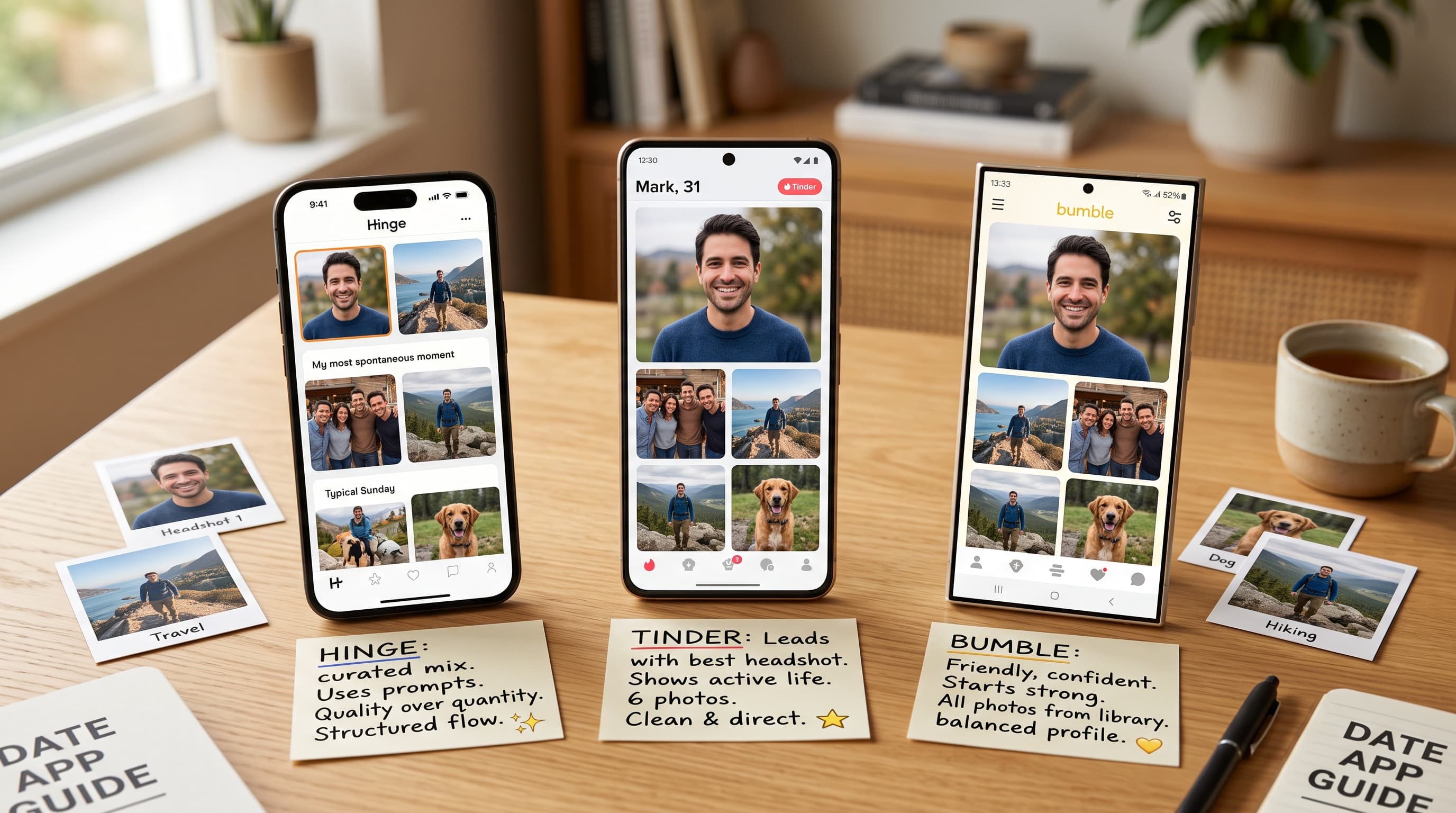
You can reuse the same photo library across all three apps, but you should not keep the same order everywhere. In 2025, Hinge said members need 4-6 photos plus 3 prompt answers, and in 2026 Bumble said 4-6 photos work best, while Tinder can hide profiles in many regions without a valid face photo (Hinge, 'How do I edit my profile?', 2025; Bumble, 'Uploading profile photos and videos', 2026; Tinder, 'My profile is hidden', 2026).
That is the real difference. Tinder asks your first photo to win a fast recognition test. Hinge asks your photos to work with prompts and comments. Bumble asks for a clear first impression and a fuller profile story. Same library, different jobs.
Key Takeaways
- Reuse one strong library, but not the same order everywhere.
- Hinge needs 4-6 photos plus 3 prompts.
- Tinder needs the clearest solo opener.
- Bumble says 4-6 photos work best.
Should You Use the Same Photos on Tinder, Hinge, and Bumble?
Yes, you can reuse one core library, but the order should change by app. Hinge requires 4-6 photos plus 3 prompts, Bumble says 4-6 photos work best, and Tinder may hide profiles without 1 valid face photo, so the same lineup should not sit in the same slots everywhere (Hinge, 'How do I edit my profile?', 2025; Bumble, 'Uploading profile photos and videos', 2026; Tinder, 'My profile is hidden', 2026).
That means you do not need three separate identities. You need one photo set that covers face, body, lifestyle, warmth, and context. Then you reshuffle the order so the first two slots match the way each app is actually used.
The mistake is not reusing photos. The mistake is reusing the same opening logic. A city portrait can be your Tinder opener, your Bumble slot two, and your Hinge slot three. What changes is the job of the slot, not always the photo itself.
Use this decision rule for order: Tinder should open with instant recognition, Hinge should open with a comment-worthy cue, and Bumble should open with a clean, authentic first impression. Put social proof, travel, pets, and hobbies lower unless they are unusually strong and still make your face obvious.
What Changes on Tinder?
Tinder needs your clearest solo opener because the app may hide profiles without at least 1 valid face photo in many regions, and its Photo Selector filters out group shots while weighing lighting and composition (Tinder, 'My profile is hidden', 2026; Tinder, 'Photo Selector', 2026).
Why does that matter? Tinder gives your first image the hardest job. If a stranger needs a second look to work out which person you are, the rest of the lineup rarely gets a fair shot.
Tinder also says users with match problems should update their photos and turn on Smart Photos so the app can lead with the most-liked image (Tinder, 'Problems with Matches', 2026). That is useful, but it is not magic. Smart Photos can test between decent options. It cannot rescue a weak or unrecognisable first photo.
Lead with your easiest win: clear face, strong light, no visual clutter, no friend confusion. Then place your activity, social, or style photos lower. If you want a Tinder-only sequencing breakdown, use this guide to Tinder photo order.
What Changes on Hinge?
Hinge rewards photos that start conversations, not just photos that look polished. The app requires 4-6 photos plus 3 prompt answers, and members can like a specific photo or prompt, so each early image should give someone an easy opening line (Hinge, 'How do I edit my profile?', 2025; Hinge, 'Likes', 2025).
This is why a good Hinge opener is not always the same as a good Tinder opener. You still need recognisability, but you also need one early photo that hands someone an easy comment instead of a blank stare.
Hinge's Top Photo feature adds another layer. In 2025, Hinge said Top Photo predicts which picture is most likely to receive a Like and moves that image to the top of your profile (Hinge, 'What is Top Photo?', 2025). So yes, order matters, but the variety inside the set matters first.
Think of Hinge as a conversation board, not just a swipe board. One photo can prove attractiveness. Another should prove personality. Another should make your prompts feel believable. For app-specific examples, build from this Hinge picture lineup.
What Changes on Bumble?
Bumble works best when your first photo is unmistakably you and the rest of the set fills out a fuller story. Bumble says 4-6 photos work best, and profiles with 6 photos are nearly 2x more likely to get likes than profiles with 3 (Bumble, 'Uploading profile photos and videos', 2026; Bumble, 'Here’s what Bumble data says about adding photos', 2026).
Bumble's first-photo guidance is also blunt. The app says your first photo creates the first impression, and its Best Photo feature looks at how people respond to your first 3 photos and can move the strongest one to the top (Bumble, 'How to Choose the Best First Photo on Bumble', 2026). That is a big hint about placement.
Use Bumble to tell a clean six-slot story. Think calm, readable, and recent. Start with a face-visible photo that feels natural, then show a hobby, a relaxed social moment, and keep group photos later.
If you want the moderation and layout follow-up, start with these Bumble photo rules.
Your Cross-App Photo Matrix
The easiest cross-app setup is one 6-photo library with a few lead-photo options, not three separate libraries. Bumble says 4-6 photos work best, while Hinge still requires 4-6 photos plus 3 prompts, so most readers should build once and reorder by app (Bumble, 'Uploading profile photos and videos', 2026; Hinge, 'How do I edit my profile?', 2025).
Use this practical order as your starting point. On Tinder, lead with the clearest attractive solo face, then add style, activity, and social proof. On Hinge, lead with a clear face that creates an easy comment, then support it with lifestyle, warmth, and prompt-friendly context. On Bumble, lead with the clearest face-first shot, then build towards style, hobby, social proof, and one polished final frame.
Think in roles, not favourites. A photo that is perfect for Tinder slot one can still work on Hinge or Bumble, just not at the top. Build enough range once, then move the strongest evidence to the slot where each app values it most.
If your stack feels thin, fix the missing roles before you chase tiny edits. This breakdown of photo archetypes for men helps you spot which slot you are actually missing.
Three Example Lineups
For a busy professional, Tinder might start with a crisp city portrait, Hinge with a cooking or concert shot that invites a comment, and Bumble with a relaxed outdoor smile. The supporting images can still be the same: tailored jacket, weekend hike, small dinner group, and one candid coffee-walk frame.
For an active guy, Tinder can lead with a clean face photo instead of a sweaty gym mirror. Hinge can use climbing, tennis, cycling, or surfing as a conversation cue. Bumble can show the same lifestyle without making fitness the whole personality: trail, casual shirt, friends, dog, travel jacket.
For someone recently single, the priority is freshness. Retire the old wedding-cropped picture, the blurry bar selfie, and the decade-old holiday throwback. Use a current haircut, modern clothes, daylight, and a simple location. The app order matters less if the library still looks dated.
Rotation Mistakes to Fix First
The fastest repair is usually removal, not perfection. Drop any opener where your face is tiny, shaded, tilted, masked, pixelated, filtered, cropped at the forehead, or buried behind sunglasses. Remove anything with bathroom tiles, laundry piles, car interiors, nightclub glare, messy counters, awkward arm angles, aggressive flexing, or obvious screenshot borders. Those details make people evaluate the photo instead of you.
Watch for mood mismatch too. A serious portrait, a corporate blazer, a travel cliff, a dog picture, and a loud party shot can all be good individually, yet feel chaotic together. Your lineup should have rhythm: clear, warm, active, social, personal, polished. If every frame shouts a different identity, the profile feels assembled instead of believable.
Also check how each image behaves when cropped by the app. Shoulders may disappear. A wide landscape can turn your body into a speck. Friends at the edge can become more prominent than expected. A prompt-friendly Hinge photo might lose its context when used as a Tinder opener. Before uploading, preview the first square, the full vertical view, and the tiny thumbnail. If the image fails in two of those places, move it down or replace it.
Edge Cases Worth Handling
Some profiles need a small exception. Musicians, chefs, founders, artists, nurses, teachers, travellers, and athletes may have one identity cue that deserves earlier placement because it explains their life quickly. Use that card early only when it is visually clean and still shows your face well.
Seasonality matters too. A snowboarding picture in July, a Halloween costume in spring, or a beach shot during winter can feel stale unless the image is unusually strong. Swap seasonal props when they start looking like leftovers. The profile should feel current, not archived.
Use this quick diagnostic vocabulary when reviewing the final order:
- Clarity: eyes, jaw, posture, crop, distance, resolution, exposure.
- Trust: recency, grooming, expression, clothing, cleanliness, consistency, realism.
- Context: neighbourhood, trail, kitchen, gallery, patio, studio, bookshop, court.
- Variety: portrait, movement, craft, outfit, humour, hospitality, adventure, routine.
- Friction: glare, shadow, distortion, clutter, watermark, ex-partner, costume, blur.
- Energy: calm, curious, playful, grounded, confident, relaxed, approachable, awake.
- Replace: screenshot, nightclub, elevator, locker, steering-wheel, flashback, collage, disguise.
- Upgrade: daylight, linen, denim, jacket, haircut, balcony, market, museum, picnic.
- Test: thumbnail, square, vertical, reorder, swap, compare, pause, revisit, archive.
- Avoid: squinting, smearing, overexposure, underexposure, stiffness, sameness, gimmicks.
- Keep: specificity, ease, warmth, balance, proportion, presence, momentum, sincerity, freshness, recognition.
How Do You Build One Photo Library for All Three Apps?
Build the library before you micro-optimise the order. In 2025, Frontiers in Communication reported that an online dating experiment with 389 participants linked multiple pictures and richer visual elements to stronger dating intentions than a one-picture profile (Frontiers in Communication, 'Enhancing online dating profiles with rich media and text cues', 2025).
Start with five core roles: one clear face photo, one full-body or style photo, one activity photo, one social or context photo, and one warm everyday shot. If you have a sixth slot, use it for travel, a pet, or a dressed-up frame. You do not need six expensive scenes. You need six useful jobs.
What if one role is missing? Shoot or generate only that gap. If you already have a good face-first photo, do not replace it just because another app exists. Replace the weak middle.
In our experience, the men who use multiple apps rarely need three separate photo shoots. They need one stronger library with a different opener on each app. If you want to audit the basics before you reorder anything, start with these dating profile photo basics.
A Quick Photo Library Audit
Before you blame the app, inspect the actual stack. Your opener should survive a small crop, poor hallway lighting, and a three-second glance. Check whether your eyes are visible, your expression feels relaxed, and the background stays quiet enough that a stranger reads you before the room.
Next, scan for variety. A useful library has texture: one portrait, one outfit or full-body frame, one outdoor scene, one hobby cue, one social moment, and one everyday image that feels warm without looking staged. Avoid six versions of the same blue-shirt selfie. Repetition makes even a decent face look dull.
Finally, remove friction. Sunglasses, harsh flash, mirror clutter, cropped friends, old haircuts, gym-only angles, blurry travel snaps, and over-edited skin all force extra interpretation. Each image should answer a different question: What do you look like? How do you spend time? Would meeting you feel normal? When the library answers those questions, app-specific ordering becomes much easier.
Where the Tool Fits
If your current camera roll covers the right roles but lacks enough usable options, this tool can fill those gaps quickly. As of 27 June 2026, the site says packages start at £11, photos are ready in about 10 minutes, and outputs are built from your existing photos rather than a blank prompt (TinderProfile.ai, 2026).
The useful order is simple. First decide what each app needs from slot one and slot two. Then use the tool to fill the missing role. It uses your uploaded photos to train a personalised model and can generate 20-100 dating-focused images depending on package, so you can create more than one credible opener without forcing every app to share the exact same lead shot.
Keep the claim boundary clear. The site says customers report 3x to 8x more matches on average, but that is a site-reported outcome claim, not a guarantee for every user (TinderProfile.ai, 2026). The real win here is speed: build enough honest variety to test the right opener on each app instead of recycling the same three weak shots forever.
Conclusion
The short version is simple: keep one strong library, then let each app ask for a different opening move. Tinder wants the easiest face-first win. Hinge wants photos that can earn a like or comment. Bumble wants a clear first impression plus enough variety to support a fuller story.
Do that well and your profile feels consistent without feeling copy-pasted. Audit slot one on each app today. If the opener is wrong, fix that first. If the library is too thin, add the missing roles before you rewrite everything else.
Frequently Asked Questions
Should I use different first photos on each app?
Usually, yes. Hinge says Top Photo can move the image most likely to receive a Like to the top, Bumble's Best Photo evaluates the first 3 photos, and Tinder suggests Smart Photos when match quality is weak. That gives the opener a different job on each app, even when the underlying library stays the same (Hinge, 'What is Top Photo?', 2025; Bumble, 'How to Choose the Best First Photo on Bumble', 2026; Tinder, 'Problems with Matches', 2026).
How many photos should I use per app?
Aim for a six-role library. Hinge requires 4-6 photos plus 3 prompts, and Bumble says 4-6 photos work best while allowing up to 6 photos or videos. Tinder is more flexible, but a thin profile still underperforms, so 6 strong roles is the safest cross-app baseline (Hinge, 'How do I edit my profile?', 2025; Bumble, 'Uploading profile photos and videos', 2026).
Where should group photos go?
Yes, but place them later. Tinder's Photo Selector filters out group shots, and Bumble says your first photo should clearly show your face and identity. Use group photos as proof you have a social life, not as the image that makes someone work out which person you are (Tinder, 'Photo Selector', 2026; Bumble, 'How to Choose the Best First Photo on Bumble', 2026).
Can AI photos still work across all three apps?
They can, if they still look like you. As of 27 June 2026, TinderProfile.ai says its entry package starts at £11 and results are ready in about 10 minutes, which makes it useful for filling a missing lifestyle or style slot quickly (TinderProfile.ai, 2026). Use AI to add believable variety, not to create a different identity.