



You see who liked you on Tinder on the Likes page, and Tinder unlocks that page only for Tinder Gold and Tinder Platinum subscribers (Tinder Help Center, Likes, checked 18 November 2026). On the free tier and on Tinder Plus, the photos in your Likes You grid stay blurred. Without paying, the reliable way to find out is to like the people you're interested in as you swipe: if someone has already liked you, your like turns into a match.
You can't control who likes you. You can control why they do, and that part is mostly down to your photos.
Seeing your Tinder likes: the short answer
- The Likes page shows who has already liked you, but only with Tinder Gold or Tinder Platinum.
- Free members and Tinder Plus members see the Likes You grid with blurred photos.
- Without paying, you find out when you like someone back and it becomes a match.
- Apps that promise to unblur your likes break Tinder's Terms of Use and can cost you the account.
- If you barely get likes, sort out your photos first. Paying to see a small number of likes doesn't change the number.
What Tinder Shows You for Free and What Needs Gold
Tinder splits this feature by tier. We checked Tinder's own help and feature pages on 18 November 2026. The table shows the likes features by tier.
| Feature | Free | Tinder Plus | Tinder Gold | Tinder Platinum |
|---|---|---|---|---|
| See who liked you on the Likes page | No, photos blurred | No, photos blurred | Yes | Yes |
| Unlimited likes | No | Yes | Yes | Yes |
| Prioritised Likes | No | No | No | Yes |
Sources, all checked 18 November 2026: Tinder Help Center, Likes, Tinder Help Center, Recently Active, Tinder Help Center, Tinder subscriptions and Tinder subscription tiers.
Two notes from the same pages. Tinder says it is testing Likes as a stand-alone purchase for iOS users in select markets, so you may see a one-off option instead of a subscription. Tinder also notes that some Plus subscribers may see ads because of testing, and tells you to check the subscription details in the app. Prices differ by market and billing period, so check them in the app before you buy. If you're choosing between the two paid tiers, our Tinder Gold vs Platinum comparison covers that decision.
How the Tinder Likes View Works Today
The Likes page sits behind the heart icon at the bottom centre of the main screen. With Gold or Platinum, it shows the people who have already liked your profile. You tap a profile to view it, then swipe left to dismiss it or right to match (Tinder Help Center, Likes).
Without Gold or Platinum, the same Likes You grid shows blurred profile photos. Tinder's help page on Recently Active says you still see the green activity dot, but every photo in the grid stays blurred (Tinder Help Center, Recently Active).
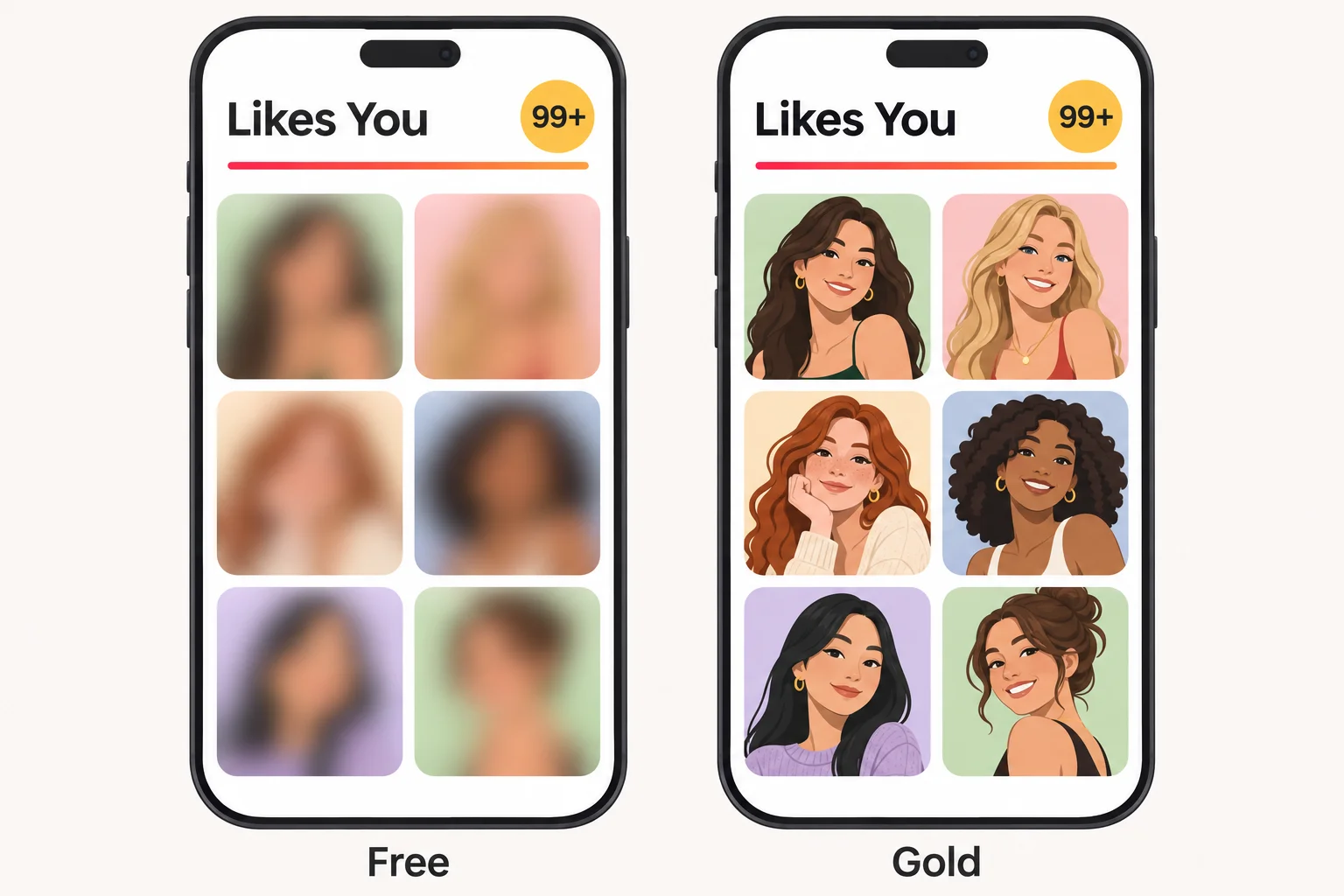
Why Are My Likes Blurred on Tinder?
Your likes are blurred because seeing them is a paid feature. Nothing is wrong with your account. The blur lifts only with Gold or Platinum, or with the stand-alone Likes purchase where Tinder is testing it.
Does Tinder Show How Many Likes You Have?
Yes. Without a subscription, the Likes You tab shows how many people have liked you, and the number reads "99+" once it passes 99. What you don't get is who they are: the photos behind the number stay blurred. Tinder doesn't explain in its help pages what the number counts, so treat it as a rough signal of interest, not a list of matches waiting for you.
Look your best on every dating app. In 10 minutes our AI creates realistic dating photos designed to get you more likes, better matches and better dates.
- Get a profile you're proud of
- Proven to increase matches on dating apps
- Turn great matches into more dates
How to See Who Liked You on Tinder Without Paying
One method always works without paying and without risk: swipe as normal and like the people you're interested in. When you like someone who has already liked you, Tinder makes it a match. You don't see your likes in advance, but you find out about every mutual like.
Two Tinder features also show you single likes without a subscription. Someone who has Super Liked you appears in your card stack with a bright blue star, so a right swipe is an instant match (Tinder Help Center, Super Like). And when Tinder shows you a Secret Admirer card, you pick one of four hidden profiles of people who have already liked you, and Tinder reveals that person (Tinder Help Center, Secret Admirer, both checked 18 November 2026). Neither opens the full Likes page.
What doesn't work in your favour are tools and tricks that promise to reveal or unblur your likes. Tinder's Terms of Use (effective 1 March 2026) prohibit using or developing third-party applications or services that directly interact with Tinder without its written consent. They also prohibit sharing your account with another person. Tinder reserves the right to suspend, terminate or ban an account without a refund (Tinder Terms of Use, sections 2c and 9, checked 18 November 2026).
So any app that asks for your Tinder login to show your likes puts two things at risk: your account and your login details. Unblurring a few faces isn't worth either.
Want to know when your likes come back after you run out? That's a separate question, answered in our guide on when Tinder likes reset.
Few Likes at All? Check Your Photos and Profile First
If your Likes You grid stays nearly empty, paying to see it won't help much. Gold shows the likes you already have. It doesn't create new ones. The question to answer first is why people swipe left.
The usual reasons are in your photos and profile:
- Your first photo doesn't show your face clearly, or it's dark, blurry or a group shot.
- Your photos all look the same: same angle, same room, same expression.
- Nothing in your photos says what your life looks like outside a bathroom mirror.
- Your bio is empty or doesn't give anyone a reason to start a conversation.
Our guide to the Tinder algorithm explains what Tinder says about how it shows profiles, and our Tinder profile photos guide shows what to fix photo by photo.
Not sure whether your profile is the problem? Run the free dating profile review and get feedback on your photos before you spend money on Gold.
If you don't have good photos to start with, TinderProfile.ai creates dating profile photos from 2 to 5 selfies you upload, with no prompting, and your photos are ready in 10 minutes. Better photos are the lever that gets you more likes, better matches and better dates. For the rest of the profile, see how to get more matches on Tinder.
Free photo review
Find out what your dating photos are missing
Answer a few questions and upload your photos. Get your profile score, photo-by-photo feedback, and a clear plan for what to improve.
Free results. No signup required.
Seeing who liked you on Tinder: FAQ
Can you see who likes you on Tinder for free?
Not the full list. Tinder shows the Likes page only to Tinder Gold and Tinder Platinum subscribers. Free members see the Likes You grid with blurred photos. You still find out about a like when you like that person back and it becomes a match. Someone who has Super Liked you shows up with a blue star while you swipe, and a Secret Admirer card, when Tinder offers one, reveals one person who has liked you.
Does Tinder Plus show who likes you?
No. Tinder Plus includes unlimited likes, but seeing who likes you starts with Tinder Gold. Tinder Platinum includes everything in Gold.
Does Tinder show how many likes you have for free?
Yes. The Likes You tab shows a number without a subscription, and it reads 99+ once you pass 99 likes. The photos stay blurred, so you see how many, not who.
Why are my likes blurred on Tinder?
Seeing your likes is a paid feature. Without Gold or Platinum, the photos in your Likes You grid stay blurred. A blurred grid is normal and doesn't mean anything is wrong with your account.
Are apps that show who liked you on Tinder safe?
They put your account at risk. Tinder's Terms of Use prohibit third-party applications that directly interact with Tinder without its written consent, and sharing your account with another person, and Tinder can ban an account without a refund. Don't hand your login to an app that promises to unblur your likes.
How do I get more likes on Tinder?
Start with your photos: a clear first photo of your face, variety in settings and angles, and no group shot in first place. Then give your bio something to reply to. More likes come from a stronger profile, not from seeing the likes you already have.